Want to use sharepa straight from the chat? How to connect Claude or ChatGPT
When an entry comes in through the form on your page, sharepa can send it right away to an address of your choice: a workflow in n8n, a scenario in Make, a Zap in Zapier or your own server. From there it goes on to your CRM, a spreadsheet or a Slack channel. The entry always stays stored in sharepa as well.
Forwarding entries is part of the one-time plan. You build the form itself as in the guide Build a form with your chat; nothing changes on the page.
How it works
- Get a webhook address in your tool. How that works in n8n, Make and Zapier is explained below.
- Open your page in the app under "My pages" and switch to "Settings".
- In the card "Forward entries (webhook)", paste the address and click "Save". sharepa shows you a signing secret. If you don't need it, you can ignore it.
- Click "Send test". sharepa sends a sample entry with
"test": trueand shows you right away whether it arrived.
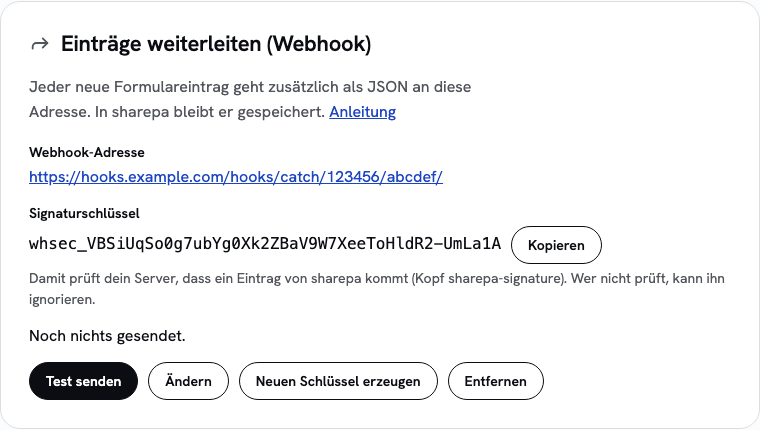
- Fill in the form on your page once yourself. The entry appears in the app and arrives in your tool at the same time.
For your safety you get an email whenever someone saves or changes a webhook address. If that wasn't you, remove the address and sign out everywhere.
n8n
Create a workflow with the Webhook node. Set the method to POST and copy the Production URL, not the test URL. Activate the workflow, otherwise n8n accepts nothing.
If your n8n runs on your own server, the address must be reachable on the normal HTTPS port. An address with its own port such as https://n8n.mycompany.com:5678/webhook/… does not work. Put n8n behind a reverse proxy, then the address looks like https://n8n.mycompany.com/webhook/….
Make
Create a scenario and choose Webhooks → Custom webhook as the first step. Click "Add", give the webhook a name and copy the address. Then click "Send test" in sharepa: Make learns the structure of the data from the sample entry.
Zapier
Create a Zap and choose Webhooks by Zapier with the event Catch Hook as the trigger. Copy the address Zapier shows and send a test from sharepa. In Zapier, fetch the sample entry with "Test trigger".
What arrives
sharepa sends every entry as a POST with content-type: application/json. The body looks like this:
{
  "type": "submission.created",
  "id": "01J…",
  "number": 42,
  "created_at": "2026-10-08T14:03:11Z",
  "form": "default",
  "page": { "id": "…", "title": "Warteliste", "url": "https://warteliste.sharepa.page/" },
  "fields": { "name": "Anna", "email": "anna@example.com", "themen": ["a", "b"] },
  "test": false
}
fields holds the fields of your form with their names. Fields with several values, such as checkboxes, come as a list. form is the name from the hidden field _formular, otherwise default. number is the running number you also see in the app.
Three headers come along:
sharepa-signature: t=<Unix time>,v1=<hex>: the signature, see the next section.sharepa-delivery: <attempt>: 1 for the first attempt, 2 for the first retry and so on.user-agent: sharepa-webhook/1
Check the signature
The signature lets your server check that an entry really comes from sharepa and was not changed on the way. v1 is an HMAC-SHA256 with your signing secret over the time, a dot and the raw body, so over ${t}.${body}. Important: take the body exactly as it arrives, not rebuilt after parsing it as JSON.
An example for Node.js:
import { createHmac, timingSafeEqual } from "node:crypto";

// body: the raw text of the request, header: the value of sharepa-signature
export function fromSharepa(body, header, secret) {
  const parts = Object.fromEntries(header.split(",").map((p) => p.split("=")));
  const t = Number(parts.t);
  // Reject old deliveries so nobody can replay a recorded request.
  if (!t || Math.abs(Date.now() / 1000 - t) > 300) return false;
  const expected = createHmac("sha256", secret).update(`${t}.${body}`).digest("hex");
  const a = Buffer.from(expected), b = Buffer.from(parts.v1 ?? "");
  return a.length === b.length && timingSafeEqual(a, b);
}
The comparison with timingSafeEqual always takes the same time, so nobody can guess the signature character by character. If you create a new secret in the app, the old one stops working right away.
When something does not arrive
An entry counts as arrived when your tool answers within 5 seconds with a status between 200 and 299. sharepa does not follow redirects, they count as errors.
If it fails, sharepa tries again: 5 minutes, 30 minutes, 2 hours, 8 hours and 24 hours after the first attempt. After that the entry counts as failed, and you get an email, at most one per page per day. Once your tool works again, click "Send again" in the card. That sends all failed entries of the last 30 days once more.
If nothing arrives for 7 days and at least 10 entries failed in that time, sharepa pauses forwarding and writes to you. A successful test or saving again starts it again.
Rarely the same entry can arrive twice, for example when your tool's response gets lost on the way. The id stays the same. If you don't want duplicates, check in your workflow whether you already know the id.
What it costs
Forwarding is part of the one-time plan and costs nothing extra. The same limits apply as for entries: 500 per page and day and 5000 per account in 30 days. What is not stored is not forwarded either.
Questions
Which addresses work?
Only addresses with https:// and a name: no IP addresses, no localhost and no internal names. Addresses of sharepa itself and of domains connected to sharepa don't work either. That way nobody can send entries in circles.
Do the entries stay in sharepa?
Yes. Forwarding is an addition. The entries stay in the app, you get the emails as before and can download them as CSV.
Who is responsible for the forwarded data?
You are, just as for the entries themselves. With the webhook they also go to the service you chose. What that service does with them, and whether it is outside Switzerland or the EU, is your responsibility. Name it in your privacy policy if needed.
Does this work on the free plan?
No, forwarding is part of the one-time plan. On the free plan the entries land in the app, as a table and as CSV.