This article is not legal advice. It describes the rules in the EU and Switzerland as of 31.10.2026.
A contact form needs a short notice saying what you use the data for, with a link to your privacy policy. A consent checkbox is usually not needed and can even be counterproductive. Ask only for what you need to reply, store entries securely and delete them once the request is dealt with. The same applies under Swiss law.
Jump to the templates Jump to the checklist
Few parts of a website raise as many privacy questions as the contact form. Does it need a checkbox? Must the phone number be optional? Where does the data go if you use Google Forms? The answers are simpler than many templates suggest.
This article covers the GDPR and, alongside it, the Swiss Federal Act on Data Protection (FADP). What a website needs in general, such as rules on cookies and embedded services, is in Do I need a cookie banner?
What the law requires
EU. Under the GDPR, every processing of personal data needs a legal basis under Article 6. For a contact form this is usually steps prior to a contract (Article 6(1)(b)) when someone asks about an offer, or your legitimate interest in answering enquiries (Article 6(1)(f)). In addition, Article 13 requires you to inform people: who is responsible, the purpose, the legal basis, recipients, how long you keep the data and what rights people have.
Switzerland. The FADP does not require a legal basis as long as processing is lawful, proportionate and recognisable to the person concerned. Under Article 19 you must still inform people when you collect their data: who you are, the purpose, the recipients and, for transfers abroad, the country.
Both systems share the same principle: only as much data as needed, only for as long as needed, and kept secure.
Consent checkbox: yes or no?
The most common question is about the checkbox "I have read the privacy policy and agree". The short answer: you usually do not need it, and sometimes it does harm.
Someone who sends you a message wants a reply. To give one, you need no consent under the GDPR, because steps prior to a contract or your legitimate interest are enough as a legal basis. Neither the GDPR nor Swiss law asks people to agree to a privacy policy. They must be able to read it; they do not have to accept it.
The checkbox becomes a problem if you actually want to rely on consent. Consent must be freely given. If the form cannot be sent without ticking the box, it is hardly free. People can also withdraw consent at any time, and you would then have to delete the request, even if you still need it for an ongoing quote.
A checkbox is right when you want something in addition to the reply, such as sending a newsletter. Then it is optional, not pre-ticked, and the form works without it.
Required fields and data minimisation
Ask only for what you really need to reply. For a contact request that is usually two things: a way to answer and the message itself.
- Required: email address (or phone number if you call back) and message.
- Optional: name, company, phone, city. Mark them as optional rather than quietly requiring them.
- Leave out: date of birth, postal address, title, anything you do not need to reply.
Forms with a clear purpose may ask for more if the purpose requires it. A request for childcare at a wedding needs the date and the number of children; a general contact form does not. How to build such a form on a landing page is covered in a separate guide.
Be careful with fields for special categories of data, such as health, religion or political opinions. Both systems require special grounds for these, usually explicit consent. An open message field invites some people to share more than necessary. A line such as "Please do not send us health information here" helps.
Templates
The following texts are templates for a simple contact form. Replace the parts in square brackets and adapt the text if your form does more, for example forwards entries to another tool.
Notice next to the form
Place the notice directly above or below the "Send" button. Keep it short and link your privacy policy.
Template EU
Template Switzerland
Section for your privacy policy
This section belongs in your privacy policy, under a heading such as "Contact form".
Template EU
Template Switzerland
Where the entries end up
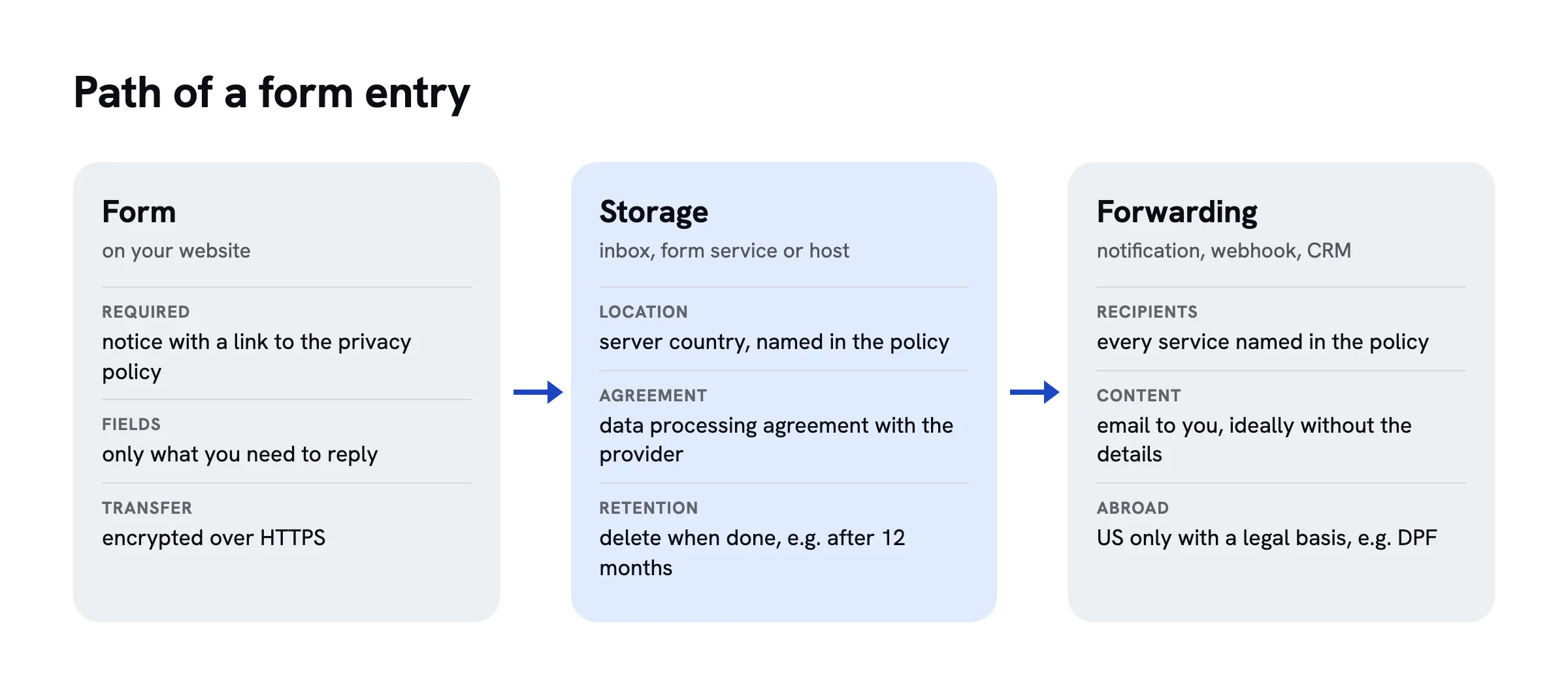
A form is only as privacy-friendly as the place where its entries are stored. There are three common ways.
By email. The form sends each entry to your inbox. That is simple, but entries then sit in your mailbox, often for years, and pass through your email provider. The mailbox belongs in your privacy policy, and you have to organise deletion yourself.
With a form service. Services such as Google Forms, Jotform, Typeform or Tally store entries for you. Check three things for each one: Where are the servers, and can you choose a location in the EU or Switzerland? Is there a data processing agreement? Does the provider use the data for its own purposes? Google Forms stores data in Google's data centres; businesses can conclude a data processing agreement through Google Workspace.
On your own website. Some site builders and hosts store entries directly. The same questions apply: location, agreement, purpose.
For data going to the US, the Data Privacy Framework has applied in the EU since July 2023 and in Switzerland since 15 September 2024. It allows transfers to certified US companies. The EU General Court upheld it in September 2025 (case T-553/23); an appeal to the Court of Justice is pending. If you want to be on the safe side, choose a provider with servers in the EU or Switzerland.
The form must also be sent encrypted, over an address starting with https://. That sounds obvious but is not always the case. Without encryption, others on the same network, such as public Wi-Fi, can read along. A form on a page without HTTPS breaches the duty to keep data secure in both systems.
Set a retention period and stick to it. Twelve months after the last message is common for general enquiries. Anything that becomes a contract is kept according to the rules for business records.
Protection against spam
Every open form attracts spam sooner or later. The usual defence is a captcha, and that is another privacy trap.
Google reCAPTCHA is widespread, but it is a Google service. It loads Google's code, analyses behaviour in the browser and transfers data to the US. In the EU, many consider consent necessary for it; in Switzerland you need at least a notice and a way to object. A contact form that only works after consent is impractical.
There are leaner ways:
- Honeypot: a hidden field that people cannot see and so leave empty. If a program fills it in, the entry is discarded. No third party, no data.
- Time check: anyone who submits the form in less than three seconds is hardly human.
- Rate limit per sender: the server accepts only a few entries per minute from the same IP address and forgets the address afterwards.
- Privacy-friendlier captchas: services such as Friendly Captcha from Germany or Cloudflare Turnstile say they work without cookies and without profiles. They still belong in your privacy policy.
For a normal contact form, a honeypot, a time check and a rate limit are usually enough. A captcha is worth it only if a lot of spam still gets through.
Special cases
Newsletter sign-up. Here you need consent, and double opt-in is standard practice: after signing up, people receive an email with a confirmation link, and only then do you send the newsletter. This proves that the address belongs to the person who signed up. How to build a waitlist or newsletter sign-up is covered in a separate guide.
Event registrations. Ask only for what you need for the event and delete the list afterwards. If you ask about dietary requirements, allergies or religion may come up; keep the question open and optional.
Job applications. CVs contain a lot of data, often sensitive. A normal contact form is not the right channel. Use a dedicated form with a short retention period after the process ends.
Health, payments, passwords. Such data does not belong in a simple contact form. Many form services exclude it in their terms.
Contact forms on sharepa
sharepa puts pages built in an AI chat online, including forms that you can build with your chat. A form that sends to /__sharepa/formular stores each entry for you:
- Only what the form asks for is stored, plus the time and the name of the form. sharepa stores no IP address, country or device with an entry.
- Entries are stored in the EU, with Cloudflare, and sharepa deletes them automatically after twelve months. You can delete them earlier, one by one or all at once, and download them as a file.
- Notifications contain no content. You get an email with the number of new entries; you see the entries themselves in the app.
- No leaks to other servers. Forms on a sharepa page can only send to the page itself. Fields that look like passwords or card numbers are rejected.
Two things are up to you. If you set up a webhook with the one-time plan, for example to n8n, Make or Zapier, entries also go there, and that service belongs in your privacy policy. And you are responsible for the data of the people who fill in your form; sharepa processes it on your behalf, as described in the Annex on data processing. The pages themselves are served by Cloudflare, a US company that processes IP addresses in doing so.
Checklist
Checklist
Questions
Does a contact form need a GDPR checkbox?
Usually not. To answer a request you need no consent under the GDPR, because steps prior to a contract or your legitimate interest are a sufficient legal basis. What you need is a notice next to the form with a link to your privacy policy. A checkbox is only needed for extras such as a newsletter.
What should the privacy notice on a contact form say?
What you use the details for and a link to your privacy policy. In the EU it is common to name the legal basis as well. The full details, such as recipients, storage location and retention period, belong in the privacy policy itself.
Which fields can I make required?
Only what you need to reply, usually the email address and the message. Name and phone number can be optional. Requiring more than necessary breaches the principle of data minimisation, in the EU and in Switzerland.
Is Google Forms GDPR compliant?
That depends on your setup. Google stores entries in its own data centres, including in the US, based on the Data Privacy Framework. Businesses can conclude a data processing agreement through Google Workspace. If you do not want data to go to the US, choose a service with servers in the EU or Switzerland.
How long can I keep contact form enquiries?
As long as you need them for the request. Twelve months after the last message is common for general enquiries. If the enquiry turns into an order, the retention rules for business records apply, which can mean up to ten years.
Sources
- Regulation (EU) 2016/679 (General Data Protection Regulation), Articles 6 and 13, EUR-Lex, retrieved on 31.10.2026
- Federal Act on Data Protection (FADP), Articles 6 and 19, Fedlex, retrieved on 31.10.2026
- FDPIC: Disclosure of personal data abroad, Swiss-U.S. Data Privacy Framework (German), retrieved on 31.10.2026
- EU General Court, judgment of 03.09.2025, T-553/23, Latombe v Commission, Curia, retrieved on 31.10.2026
- Google Workspace: Data Processing Amendment, retrieved on 31.10.2026
- Kontaktformular DSGVO-konform gestalten, IT-Recht Kanzlei (law firm, not an official source, German), retrieved on 31.10.2026
- Friendly Captcha: Privacy, retrieved on 31.10.2026