This article is not legal advice. It describes the rules in the EU and Switzerland as of 31.10.2026.
In the EU, a website needs consent for everything it stores on or reads from a visitor's device unless it is strictly necessary, and a banner is the usual way to ask. In Switzerland you must inform visitors and let them refuse, and consent is only required for unexpected or high-risk tracking. If your site sets only necessary cookies and loads nothing from third-party servers, you need no banner in either.
Cookie banners are everywhere, so many site owners assume the law requires one. It only does when the site does something that needs consent or a way to object. If you know what your site loads, you can often drop the banner, and your visitors will thank you.
This article explains the rules in the EU and in Switzerland, where they differ, and which embedded services quietly trigger a banner.
What a cookie banner is for
A cookie banner is a tool, not a goal. It does two things: it tells visitors what is stored on or read from their device, and where needed it asks them to decide, either by consenting or by refusing.
The rules are not limited to cookies in the narrow sense. The EU rules speak of "storing information" on a device and "gaining access" to it, which covers local storage, tracking pixels and fingerprinting as well. The Swiss data protection authority lists the same technologies in its 2026 fact sheet.
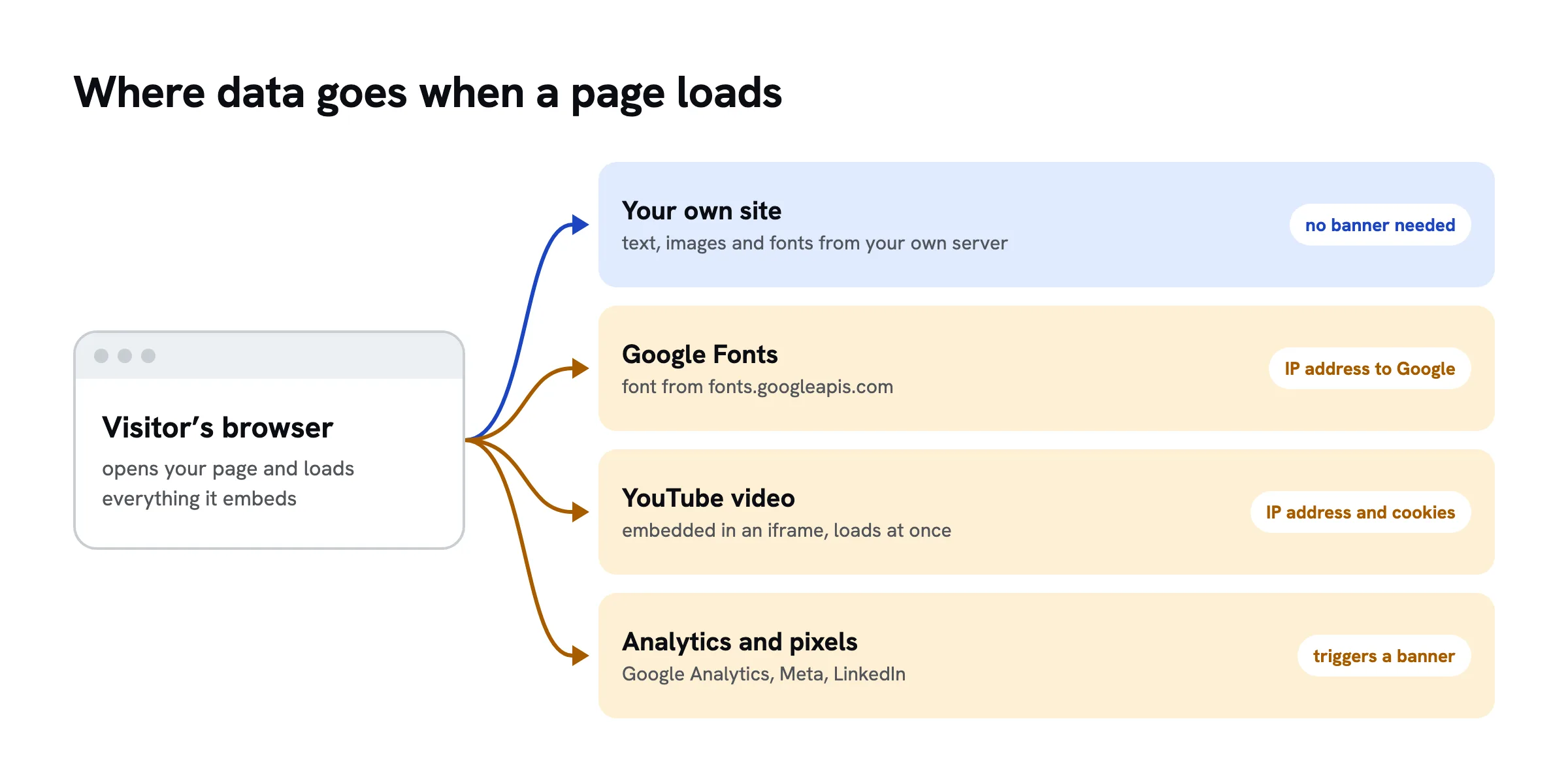
There is a second point that is easy to miss. When your page loads something from another company's server, such as a font, a video or a script, that server learns the visitor's IP address. That is a transfer of personal data to a third party, even if not a single cookie is set.
EU: what ePrivacy and the GDPR require
Two sets of rules apply in the EU.
The ePrivacy Directive, Article 5(3). It requires consent before a website stores information on a visitor's device or reads it. There are two exceptions: storage needed only to transmit a communication, and storage that is strictly necessary to provide a service the user has explicitly asked for. Each member state has written this into national law. In Germany it is § 25 TDDDG, known as TTDSG until 2024; in Austria it is part of the Telecommunications Act.
The GDPR. It governs what happens to personal data afterwards. Every processing needs a legal basis under Article 6, and visitors must be informed under Article 13, usually in a privacy policy. For analytics with cookies, the legal basis in practice is consent. An opt-out is not enough.
Consent under the GDPR must be freely given, specific, informed and unambiguous. For banners, this means:
- Refusing must be as easy as accepting. A banner with only "OK" or "Accept all" does not collect valid consent.
- Boxes must not be pre-ticked.
- Non-necessary cookies may only be set after the visitor has agreed, not when the page opens.
- Withdrawing consent later must be as easy as giving it, typically through a link in the footer.
What counts as strictly necessary
Strictly necessary means the service the visitor asked for cannot work without it. Typical examples are a login session, a shopping cart, a language choice and the stored banner decision itself. Analytics, advertising and social media plugins are not necessary in this sense, however useful they are to the site owner.
Switzerland: what the FMG and the FADP require
Swiss law takes a different approach. The Federal Data Protection and Information Commissioner (FDPIC) summarises it in a guide published on 22 January 2025 and updated on 6 October 2025.
The Telecommunications Act (FMG), Article 45c. In force since 2007, it allows processing data on other people's devices only if users are told about the processing and its purpose and that they can refuse it. That is an opt-out, not consent.
The Federal Act on Data Protection (FADP). It governs the personal data collected through cookies. Under Article 19 you must inform people when you collect their personal data, which in practice means a privacy policy.
From the FDPIC guide, three levels follow:
- Technically necessary cookies need neither consent nor a banner. You still mention them in your privacy policy.
- Non-necessary cookies, such as analytics or advertising, are allowed if you inform visitors and offer an opt-out, in principle before the cookies become active. The option to object must be shown prominently and be easy to use.
- Express consent is required when the use is unexpected, involves high risk, for example high-risk profiling, or concerns sensitive personal data. Advertising tracking across many websites can fall into this level.
For statistics, the FADP offers a simplification: analysing visitor flows is justified if the data is anonymised promptly and the results do not identify anyone. An external analytics tool meets this only if the provider does not use the data for its own purposes.
A Swiss website must also follow the GDPR if it offers goods or services to people in the EU or monitors their behaviour (Article 3(2) GDPR). A Zurich accountant with local clients is hardly affected; an online shop shipping to Germany is. If in doubt, follow the stricter EU rules.
EU and Switzerland compared
| What your site does | EU | Switzerland |
|---|---|---|
| Only necessary cookies (session, cart, language) | no banner, mention in privacy policy | no banner, mention in privacy policy |
| Analytics without cookies or identifiers | no banner, mention in privacy policy | no banner, mention in privacy policy |
| Analytics with cookies, data only for you | consent | information and opt-out |
| Advertising, retargeting, third-party pixels | consent | information and opt-out; consent for high-risk profiling |
| Fonts, videos or maps from third-party servers | consent, or host locally | information, opt-out depending on the service |
| Sensitive data (health, religion) | explicit consent | express consent |
The table simplifies, but the pattern is clear. The less your site loads from third parties and the less it stores about visitors, the closer the two systems come, until neither requires a banner.
The hidden traps
Most websites need a banner not because of their own cookies but because of services they embed, often without their owners knowing.
Google Fonts. Loading fonts directly from Google gives Google every visitor's IP address. In January 2022 the Regional Court of Munich awarded a visitor 100 euros in damages for exactly this (case 3 O 17493/20). A wave of mass warning letters followed, which the same court found unjustified in March 2023 (case 4 O 13063/22). The fix has not changed: host the fonts on your own server and Google learns nothing.
Embedded videos. A YouTube video in an iframe loads Google's code as soon as the page opens, even if nobody presses play. The common solution is a two-click embed: the video only loads after the visitor clicks a preview image. Or link to the video instead of embedding it.
Maps. Google Maps and similar embeds behave like videos. A static image of the map with a link to directions often does the job.
Analytics and pixels. Google Analytics, the Meta pixel or the LinkedIn tag are the most common reasons for a banner. In the EU they need consent; in Switzerland at least an opt-out, and possibly consent for tracking across many sites.
Pages built with AI. If you build a page with Claude, ChatGPT or Gemini, the code often loads fonts from Google or a script from a public CDN. You cannot see that in the result. Tell your chat explicitly: "Do not load fonts, scripts or images from external servers; use system fonts."
How to check what your site loads
You need no special tool, only a desktop browser.
- Open your website in a private window so that old cookies do not interfere.
- Open the developer tools: press F12 in Chrome, Edge or Firefox. In Safari, enable them first under Settings › Advanced.
- Go to the "Network" tab and reload the page.
- Sort by "Domain". Anything that is not your own address is a third-party server. Typical names:
fonts.googleapis.com,fonts.gstatic.com,www.youtube.com,www.googletagmanager.com,connect.facebook.net. - Go to the "Application" tab (Firefox: "Storage") and check "Cookies" and "Local storage".
If step 4 shows no third-party address and step 5 shows only a session or language cookie, your site needs no banner. If something shows up, decide for each entry: remove it, host it yourself or run it with a banner.
Site builders such as Wix, Squarespace or WordPress with plugins may load their own analytics, fonts or chat widgets depending on your settings. This check tells you what they actually load in your case, more reliably than any marketing claim, including the provider's own.
Analytics without cookies
For most small websites, analytics is the only reason for a banner. It works without cookies, too: the server or an analytics service counts visits and keeps only aggregated values such as country, device and referrer, without an identifier that recognises a visitor across visits.
Tools that say they work this way include Plausible and Simple Analytics, both hosted in the EU. Matomo can be configured like this and run on your own server. For any provider, check whether it processes data only on your behalf, where its servers are and whether it offers a data processing agreement.
The trade-off: you see no individual journeys and no returning visitors. For the question "Do people find my page, and where do they come from?" it is usually enough.
A website without a cookie banner on sharepa
sharepa puts pages built in an AI chat online, at their own address or on your domain. For the banner question, this is what matters:
- Analytics without cookies or identifiers. sharepa counts visits on the server, with no script in the browser, no cookie, and without storing the IP address. Only country, device and referrer are kept, and optionally the channel from a campaign link such as
?ref=linkedin. - Only necessary cookies. A cookie is set only on password-protected pages, so visitors do not have to type the password on every visit.
- Data in the EU. Pages, statistics and form entries are stored with Cloudflare in the EU. Cloudflare is a US company and serves the pages from servers around the world, processing visitors' IP addresses in the process; sharepa does not store them.
- Forms stay with you. Forms and data requests on a sharepa page can only send to the page itself, not to other servers. What else a form needs is covered in Contact forms under the GDPR and Swiss law.
What sharepa does not prevent: if your chat adds Google Fonts, a YouTube video or an analytics script, the page loads them. Whether your sharepa page needs a banner therefore depends on what is in it. The check above tells you in two minutes.
You are responsible for your visitors' data; sharepa processes it on your behalf. The rules are in the Annex on data processing.
Checklist
Checklist
Questions
Is a cookie banner required by law?
Not as such. In the EU you need consent for anything that is not strictly necessary, and a banner is the usual way to get it. In Switzerland you must inform visitors and offer an opt-out. If your site uses only necessary cookies and loads nothing from third parties, a note in your privacy policy is enough in both.
Do I need a banner for strictly necessary cookies?
No, neither in the EU nor in Switzerland. You must still list them in your privacy policy. Cookies are strictly necessary when a service the visitor asked for, such as a login or a shopping cart, cannot work without them. Analytics does not count.
Can I use Google Fonts without consent?
Yes, if you host the font files on your own server. If your page loads them from Google, Google receives your visitors' IP addresses. In Germany this led to a court ruling in 2022 and many warning letters. Self-hosted fonts avoid the issue entirely.
Is a banner with only an "OK" button enough?
Not in the EU: without a real option to refuse, there is no valid consent. In Switzerland, the FDPIC expects the option to object to be easy to find and use. A banner that only offers "Accept all" does not meet that either.
How do I find out whether my website is GDPR compliant?
Start by checking what it loads and stores, using the browser's developer tools as described above. Then compare that with your privacy policy and your banner. A full review also covers forms, contracts with providers and retention periods; for larger sites, an expert is worth it.
Sources
- Directive 2002/58/EC (ePrivacy Directive), Article 5(3), EUR-Lex, retrieved on 31.10.2026
- Regulation (EU) 2016/679 (General Data Protection Regulation), EUR-Lex, retrieved on 31.10.2026
- § 25 TDDDG, Gesetze im Internet, retrieved on 31.10.2026
- Telecommunications Act (FMG), Article 45c, Fedlex, retrieved on 31.10.2026
- Federal Act on Data Protection (FADP), Fedlex, retrieved on 31.10.2026
- FDPIC guide on data processing using cookies and similar technologies, version 1.1 of 06.10.2025 (German), retrieved on 31.10.2026
- FDPIC: Cookies, practical tips, 31.03.2026 (German), retrieved on 31.10.2026
- Regional Court of Munich I, judgment of 30.03.2023, case 4 O 13063/22, Gesetze Bayern (German), retrieved on 31.10.2026
- Regional Court of Munich I, judgment of 20.01.2022, case 3 O 17493/20, IHK Bergisch (German), retrieved on 31.10.2026
- Plausible Analytics, Data Policy, retrieved on 31.10.2026
- Simple Analytics, Privacy Policy, retrieved on 31.10.2026
- Matomo, How do I use Matomo without cookies, retrieved on 31.10.2026