This article is not legal advice. It describes the rules in the EU and Switzerland as of 31.10.2026.
There are three ways to take bookings on your website: a link to a booking tool, an embedded widget, or booking built into the page itself. The widget is the most delicate for data protection, because it runs a third party's code as soon as your page loads. In the EU and Switzerland alike, it also matters where the service stores bookings and whether your privacy policy says so.
Jump to the templates Jump to the checklist
A "Book a call" button saves back-and-forth emails and brings in more first meetings. Most people reach for Calendly or a similar service and embed it as a widget. That is convenient, but it has privacy consequences worth knowing.
This article compares the three usual approaches and shows what applies to each under the GDPR and Swiss law. The basics on cookies and embedded services are in Do I need a cookie banner?, and handling form entries is covered in GDPR contact form.
What data a booking involves
At its core, a booking is a form with a calendar. It involves:
- The person's details: name, email address, often phone number and answers to questions like "What would you like to discuss?".
- The appointment itself: time, place or video link, and with it the fact that this person is meeting you.
- Your calendar: the service has to know when you are free. Depending on the service, it reads your whole calendar or only the busy times.
- Technical data: IP address, browser and, with embedded widgets, often the provider's cookies.
Recipients are you, the booking service, the calendar provider, the video service for online meetings and the email service for confirmations and reminders. Each of them belongs in your privacy policy.
Three ways compared
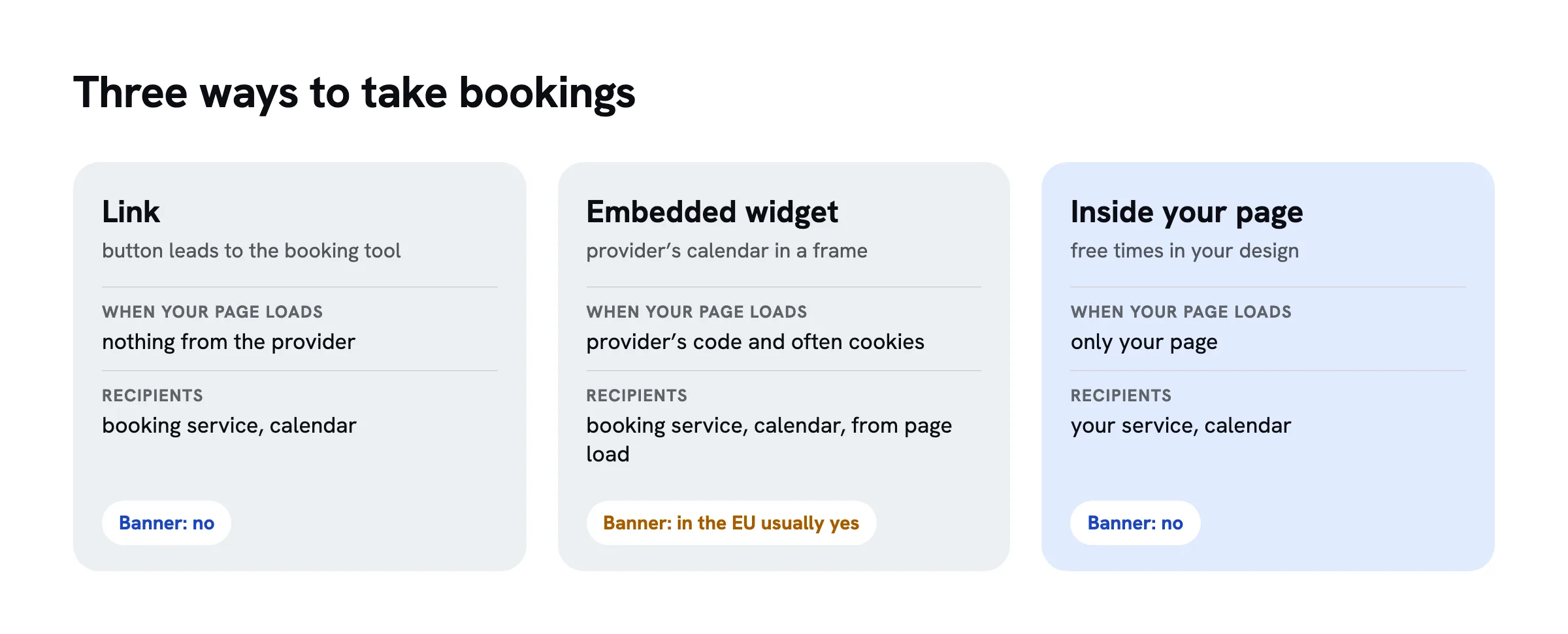
| What matters | Link to a booking tool | Embedded widget | Booking inside your page |
|---|---|---|---|
| What it looks like | button leads to the provider's page | provider's calendar in a frame on your page | calendar is part of your page |
| When your page loads | nothing from the provider | provider's code loads, often with cookies | only your page loads |
| Cookie banner because of booking | no | in the EU usually yes; in Switzerland at least a notice | no, unless other third-party services load |
| Where the booking is stored | with the provider | with the provider | with your service and in your calendar |
| Design | provider's design | provider's design, little control | your design |
The link is the simplest privacy-friendly option. Your page loads nothing from the provider. Only people who click end up there, and the provider's own privacy policy covers what it does itself. You still have to name it, because it stores bookings for you.
The widget is an embedded third-party service, just like a YouTube video. Data protection authorities recommend a two-click solution for such services: the external content loads only when the visitor wants it. In the EU, the provider's cookies need consent unless they are strictly necessary for the visitor to book. Whether they are is disputed. You are on the safe side if the widget only loads after a click.
Booking inside your page shows free times from your calendar in your own design, without a provider's frame. In data protection terms you treat it like a form: the page sends the booking to a service that stores it and adds it to your calendar. No banner is needed for it, as long as the page loads nothing else from third parties.
Calendly and other US services
Calendly, Google Calendar, Microsoft Bookings and many other booking services come from the US. Data may go to such companies if they are certified under the Data Privacy Framework. The EU has recognised this framework since July 2023, and Switzerland its own version, the Swiss-U.S. Data Privacy Framework, since 15 September 2024. For certified providers, no additional safeguards such as standard contractual clauses are needed.
The EU General Court upheld the Data Privacy Framework in September 2025 (case T-553/23). The claimant has appealed to the Court of Justice; we found no judgment at the time of writing. The framework's predecessors, Safe Harbor and Privacy Shield, were struck down by the Court of Justice in 2015 and 2020. If you do not want to depend on the current framework lasting, choose a service that stores data in the EU or Switzerland.
For US services, this means:
- Check that the provider is certified under the Data Privacy Framework. The list is at
dataprivacyframework.gov. - Conclude the data processing agreement the provider offers.
- Name the provider and the country in your privacy policy.
- Prefer linking over embedding, or load the widget only after a click.
Providers with servers in the EU or Switzerland
Some booking services say they store data in the EU or Switzerland, for example Calenso and eTermin from Switzerland, or Zeeg and Timify from Germany. Cal.com can also be self-hosted. Check each provider yourself:
- Where are the servers for your data, and can this be set out in the contract?
- Which sub-processors does it use, for example for email or video, and where are they?
- Does the embedded widget set cookies, and what for?
- Does the service read your whole calendar or only busy times?
Services from Switzerland or the EU often cost a little more than Calendly's free plan. In return, they usually offer a data processing agreement without a detour through the US. For a medical practice, a law firm or any business with confidential conversations, that is almost always worth it.
A server in Europe alone does not make a service privacy-friendly. Many European services use US companies for email, video or hosting. The list of sub-processors shows where data really goes.
Google Calendar as the foundation
Many bookings end up in a Google calendar anyway. Google offers appointment schedules, a booking page that comes straight from the calendar. It is the shortest route, but it is still a Google service, with the consequences above.
Even if you use another booking service and connect it to your Google calendar, Google learns about every booking, because the appointment is in your calendar. The person who booked often receives an invitation from Google showing your Google address. Google is then a recipient and belongs in your privacy policy. When connecting, check which permissions the service asks for. For bookings, it is enough to see busy times and create its own events. It does not need to read what is in your other appointments.
Video calls, confirmations and reminders
A booking often brings in further services that are easy to forget during setup.
Video calls. Many booking services automatically create a link to Google Meet, Zoom or Microsoft Teams. The video service is then another recipient: it learns at least that a meeting takes place, and during the call it processes video, audio and IP addresses. All three are US services. If you want to avoid that, use a service with servers in Europe or offer phone calls and in-person meetings as alternatives. Either way, the video service belongs in your privacy policy.
Confirmations and reminders. The emails after a booking are usually sent by the booking service, often through its own email provider. Many booking services track whether an email was opened and a link clicked. Check whether this can be switched off, and ask yourself whether you need those numbers.
Questions in the booking form. A booking form is a form and follows the same rules as a contact form: only necessary required fields, a short notice, no special categories of data without good reason. A physiotherapy practice that asks about symptoms when booking collects health data. That needs more than a standard service and a standard privacy policy.
Cancellations and deletion. Decide how long you keep bookings, and check whether the service deletes old ones automatically. You rarely need cancelled appointments at all, so delete them soon after the cancellation rather than keeping them for the full period.
What belongs in your privacy policy
Replace the parts in square brackets. If your booking service involves further recipients, such as a video service, add them.
Template EU
Template Switzerland
Bookings on sharepa
sharepa puts pages built in an AI chat online. With the one-time plan, a page can take bookings straight into your Google calendar, in the design your chat built, without a booking service's widget.
- No third-party content for booking. The page fetches free times and sends the booking only to sharepa. No frame or script from a booking service loads.
- Minimal calendar permissions. sharepa only sees when you are busy and creates its own events. It does not learn the titles, guests or places of your other appointments.
- Bookings stored in the EU. sharepa stores name, email and answers as a form entry with Cloudflare in the EU and deletes them after twelve months.
- Confirmation and reminder are sent by sharepa by email, with a link to cancel.
Important for your privacy policy: the appointment is in your Google calendar with the person's details, and Google sends them an invitation. Google is therefore a recipient, based on the Data Privacy Framework, and has to be named. When someone books, Cloudflare Turnstile checks that a human is booking. Cloudflare, also a US company, serves the pages and processes IP addresses in doing so. You are responsible for the data of the people who book; sharepa processes it on your behalf, as described in the Annex on data processing.
How to set up bookings is shown in the guide Bookings on your page.
Checklist
Checklist
Questions
Is Calendly GDPR compliant?
Calendly is certified under the Data Privacy Framework, so transfers to the US are permitted. Whether your use is lawful also depends on you: a data processing agreement, a mention in your privacy policy and, with the embedded widget, how cookies are handled. Linking instead of embedding is the more cautious approach.
Do I need a cookie banner for an embedded booking widget?
In the EU usually yes, if the widget sets cookies that are not strictly necessary. In Switzerland you must at least inform visitors and let them object. You can do without a banner if the widget only loads after a click, if you link to the provider, or if bookings happen inside your page.
Is there a GDPR-friendly alternative to Calendly?
Yes. Several providers say they store data in the EU or Switzerland, such as Calenso, eTermin, Zeeg or Timify, and Cal.com can be self-hosted. Check their sub-processors for email and video, and whether the calendar you connect is itself with a US provider.
Can I use Google Calendar for customer bookings?
Yes, if your privacy policy says so and names Google as a recipient. For businesses, Google Workspace's data processing terms apply. Transfers to the US rely on the Data Privacy Framework. For sensitive appointments, such as at a medical practice, that is usually not enough.
What should the booking form say?
A short notice on what you use the details for and a link to your privacy policy, as on a contact form. Only the details you need for the appointment should be required, usually name and email. A privacy checkbox is not needed.
Sources
- Regulation (EU) 2016/679 (General Data Protection Regulation), Articles 6, 13 and 45, EUR-Lex, retrieved on 31.10.2026
- Federal Act on Data Protection (FADP), Articles 16 and 19, Fedlex, retrieved on 31.10.2026
- FDPIC guide on data processing using cookies and similar technologies, version 1.1 of 06.10.2025, section 3.13.1 (German), retrieved on 31.10.2026
- FDPIC: Disclosure of personal data abroad, Swiss-U.S. Data Privacy Framework (German), retrieved on 31.10.2026
- EU General Court, judgment of 03.09.2025, T-553/23, Latombe v Commission, Curia, retrieved on 31.10.2026
- Data Privacy Framework List, U.S. Department of Commerce, retrieved on 31.10.2026
- Calendly Privacy Notice, retrieved on 31.10.2026
- Google Calendar Help: Set up appointment schedules, retrieved on 31.10.2026
- Calenso: data protection and security, retrieved on 31.10.2026