Want to use sharepa straight from the chat? How to connect Claude or ChatGPT
A page on sharepa can have a form that really does something: what visitors enter lands in your app. You get an email when new entries arrive, see them as a table and download them as CSV. There is nothing to set up.
For this to work, the form has to send to a fixed address. If you have connected sharepa as a connector, your chat knows that by itself. If you upload the code by hand, give your chat the add-on below.
How it works
- Tell the chat what you need and append the prompt add-on from the next section. An example:
Build a sign-up page for our cooking class on 14 November in Bern.
The form asks for name, email, number of people and allergies.
Plain, warm beige, large type, good on a phone.
- Copy the code from the chat and paste it on app.getsharepa.ch. Below the preview it says in green “This page collects form entries”. If there is a yellow warning instead, the form sends nowhere: give the warning back to the chat and it will fix it.
- Publish the page and fill in the form once yourself. You land on a thank-you page.
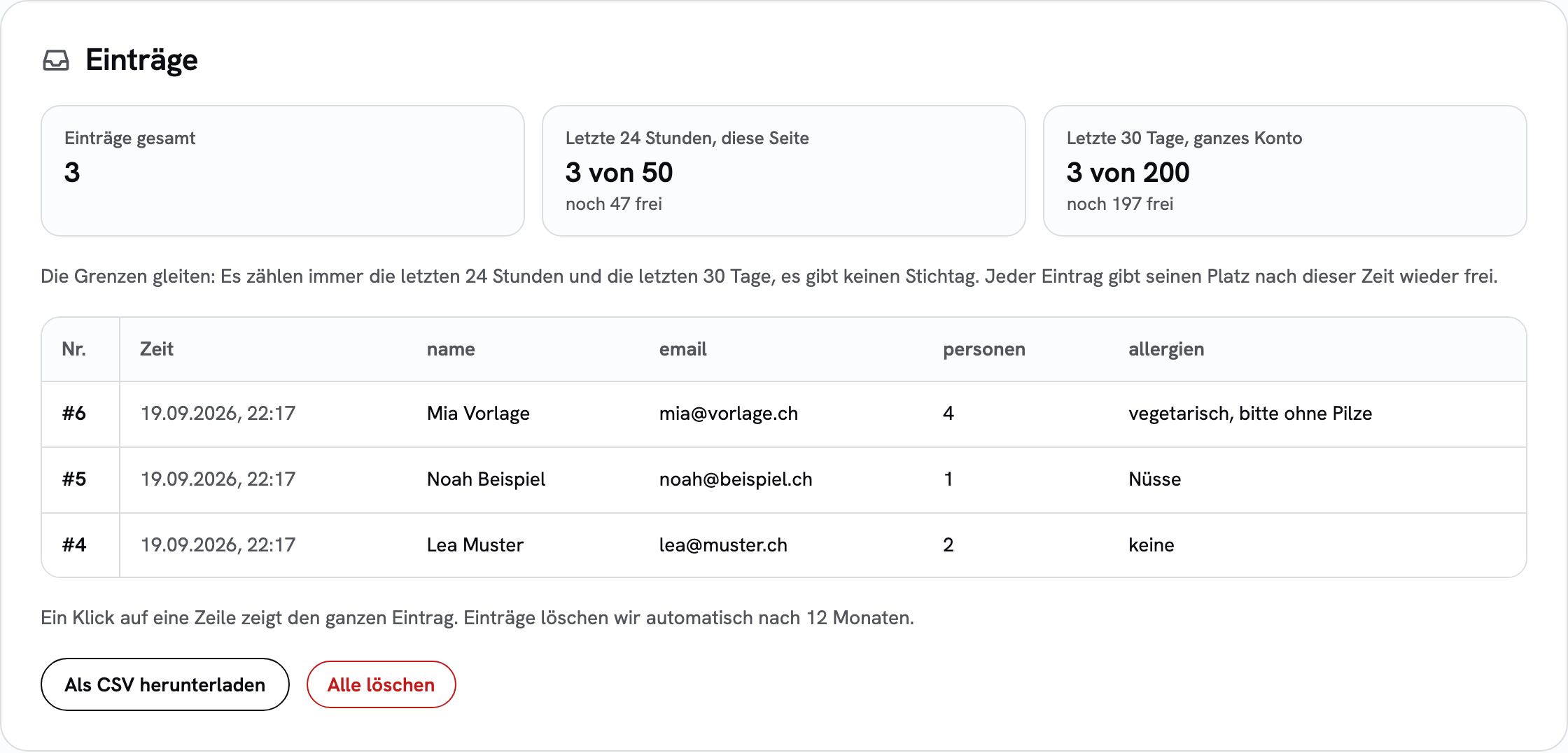
- Open the page under “My pages”. Your test is in the “Entries” section. Delete it again and the list is clean.
Prompt add-on to copy
Append this block to your prompt when you upload the code by hand. It makes sure the form is built in the right format, in HTML and in React.
Technical requirements for the form (the page is hosted on sharepa):

- The form sends to the relative path /__sharepa/formular. Do not use any other service or address, and do not invent one.

- HTML: <form action="/__sharepa/formular" method="post">, with a real submit button (type="submit"). Normally no JavaScript that prevents the submit: the visitor then lands on a thank-you page.

- If the page should stay put on submit (newsletter field, waiting list): intercept the submit and send with fetch to the same path, with the header accept: application/json and the body new URLSearchParams(new FormData(form)). On r.ok replace the form with your own thank-you message, otherwise show an error message and enable the button again. Keep action and method on the form so that it also works without JavaScript.

- React: either a native form with exactly this action and method and WITHOUT preventDefault, or on submit fetch("/__sharepa/formular", { method: "POST", headers: { "content-type": "application/json" }, body: JSON.stringify(data) }) with a flat object (only text, numbers, lists of text). If the response is ok, show your own thank-you message, otherwise an error message. Never keep entries only in component state.

- Every field has a name attribute in plain lowercase words (name, email, phone, message). The names become the column titles in my table.

- A multi-step form is ONE form whose steps are shown and hidden. It is submitted once, at the end, with all fields.

- Add a hidden field against bots: <input type="text" name="_honig" tabindex="-1" autocomplete="off" aria-hidden="true" style="position:absolute;left:-9999px">

- Optional: <input type="hidden" name="_formular" value="Sign-up"> names the form. <input type="hidden" name="_weiter" value="/thanks"> redirects to a path on the same page after submitting, instead of the default thank-you page.

- No fields for passwords, credit card or other payment data, and no health data. Such entries are rejected.

- No file uploads, they are discarded.

- The page must not send data to other servers: no form service, no external API, no fetch to another address. Such requests are blocked on sharepa.

- Below the form, add a short sentence that the details are only used for this purpose, with a link to my privacy policy. No mandatory checkbox.
What happens after submitting
You have three options, and the chat builds what you tell it:
- sharepa's thank-you page. The normal case, needs nothing. The visitor sees “Thanks, we got it” with a link back.
- A section of your own page. A hidden field
_weiterwith a path such as/#thankssends the visitor there after submitting. Works without JavaScript. - The page stays put. The form sends in the background, and your own “Thanks” appears in its place. That suits a newsletter field or a waiting list in the middle of the page. How that works is in the guide Waiting list and newsletter sign-up.
What is stored
With every entry we store the fields of your form, the time and the name of the form. Nothing more: no IP address, no country, no device. The email to you only states the number of new entries, never the content. We delete entries automatically after 12 months; download them beforehand if you need them for longer.
You are responsible for the details of the people who fill in your form. Tell them next to the form who you are and what you need the details for. The specifics are in the terms of use.
Forward entries
With the one-time plan, sharepa can also send every new entry to n8n, Make, Zapier or your own server. How that works is explained in the guide Forward form entries with a webhook.
Can my page call an external API?
No. A page on sharepa can send forms and requests (fetch) only to itself and to sharepa. Everything else is blocked by the browser before it reaches the server. That applies to form services such as Formspree or Mailchimp as much as to your own APIs.
The reason is security: the most common abuse of free hosts are fake login pages that send typed-in passwords to a foreign server. That does not work on sharepa, and every page under sharepa.page benefits.
Images, fonts and scripts from other servers still load, as do embedded contents such as YouTube or Google Maps. Only sending data is affected. If your page tries anyway, the app tells you after publishing which server it was, and the page goes live as usual otherwise.
If a page of yours really needs an external API, write to konrad@getsharepa.ch. Single pages can get a manual exception.
What it costs
Nothing. Free are 50 entries per page and day and 200 per account in 30 days. Once the limit is reached, visitors see a note and you get an email.
Questions
My form looks good, but nothing arrives. Why?
Almost always it sends nowhere. Many chats build React forms that only show “Thanks” on submit and throw the details away. sharepa warns about this in the preview. Give the chat the prompt add-on above, have it rebuild the form, then publish a new version.
Does this work with the connector too?
Yes, and then you do not need the add-on. Say for instance “Build a contact form in the style of my page and put it online”. Your chat knows the requirements and tells you after publishing where the entries land.
Do I get the content by email?
No, on purpose. The email only says that there are new entries, with a link into the app. That way your visitors’ details do not lie around in mailboxes. There is at most one email per page per hour.
Can I use it to collect newsletter sign-ups?
For a waiting list or to collect interested people: yes. A field for the email address and a button are enough; the addresses then sit in your app and can be loaded into your newsletter service as CSV. If the page should not change on submit, use the prompt add-on from the guide Waiting list and newsletter sign-up.
For a regular newsletter that alone is not enough. Whoever signs up never gets an email from sharepa, so no confirmation to click either. This double confirmation is common for newsletters and in some countries the only accepted proof that somebody really agreed. Use the sign-up form of your newsletter service for that: it points straight there, and the service sends the confirmation. On a sharepa page that works just the same, sharepa leaves a form with its own target alone.
The same address can sign up several times. You sort out duplicates after downloading.
Can the page show the entries again, a guest list for instance?
No. Entries only go in, the page cannot read them. This is a letterbox, not a database. For a public list you put the names into the page yourself and publish a new version.
What about spam?
The hidden field catches simple bots, and there are upper limits per minute, per day and per month. Entries can still be faked, because anybody can fill in the form. Delete what looks like spam in the app.
Does it work on my own domain and with a password?
Yes. The form sends to a relative path and therefore works under name.sharepa.page just as under your domain. On pages with a password, only visitors who entered the password can submit.
Can I use a form from another service?
Yes. If your form has its own target, a newsletter provider for instance, sharepa leaves it alone. The entries then land there and not in your app.