This article is not legal advice; the privacy notes describe the usual GDPR obligations.
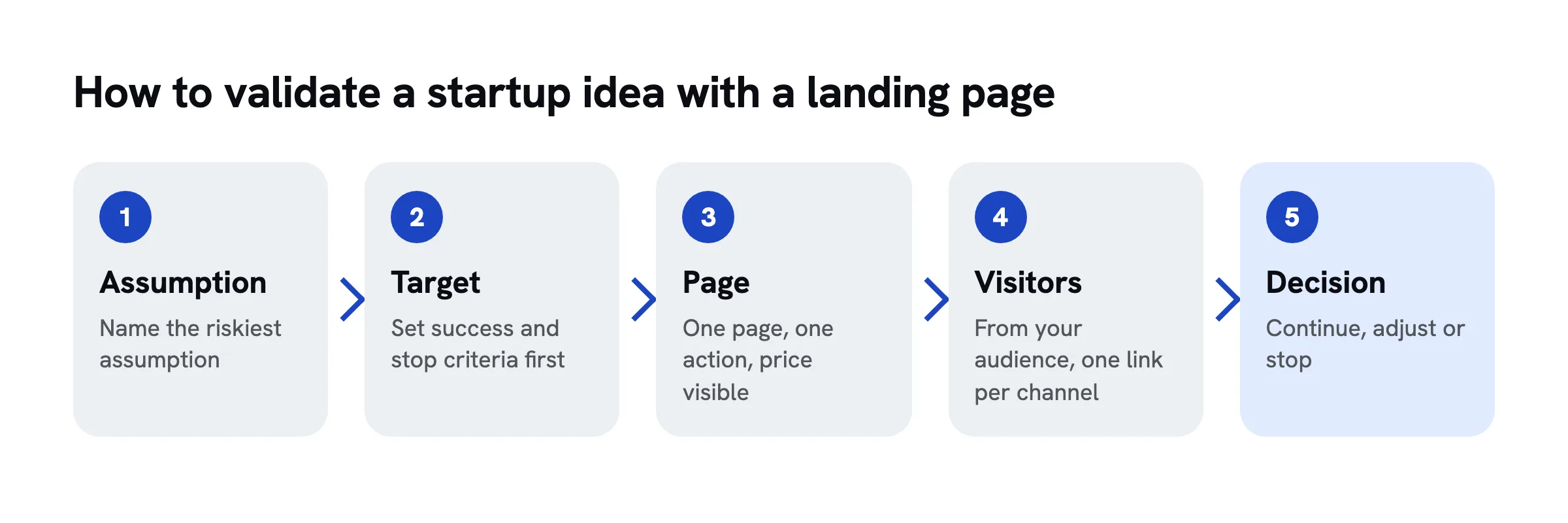
To validate a startup idea with a landing page, write down your riskiest assumption, decide in advance what counts as success, and build one page with a single action such as a waitlist or pre-order. Then send your target audience to it, measure the conversion rate, talk to the people who signed up and decide: continue, adjust or stop.
A landing page test will not tell you whether your business will work. It answers a narrower, more useful question: do strangers act when they see your offer?
The example throughout: Lea wants to start Festkinder, a childcare service for weddings. Two carers look after the guests' children so the parents can stay and dance. Whether couples would pay for it, Lea has no idea yet.
Step 1 Find your riskiest assumption
List what must be true for your idea to work, then pick the assumption you are least sure about. That is the only one you test first.
Every idea rests on a few assumptions: the problem exists, it hurts a specific group, that group will pay, and you can reach them at a reasonable cost. Test them all at once and a weak result could mean anything. Pick the one with the biggest impact and the least evidence.
Common mistake: testing the comfortable assumption instead of the risky one. Whether people like your logo says nothing about whether they will pay.
In the example
Lea's shakiest assumption: "Couples will pay for childcare at their wedding instead of leaving it to family and friends."
Step 2 Narrow down your audience
Describe your audience precisely enough that you know where to find them. "People getting married" is too broad; "couples with lots of families on the guest list" is usable.
A narrow audience sharpens the test: the page can speak their language, and you know where to go for visitors. Note who exactly, in what situation, and where they spend time online and offline. You can always widen the group later.
Common mistake: describing the audience you wish you had. People who do not feel the problem will not sign up.
In the example
Couples marrying within 18 months, with at least five children on the guest list. Lea reaches them in wedding groups and through wedding planners.
Step 3 Talk to people before you build anything
Have five to ten short conversations with people from your audience before you build the page. Ask about their experience with the problem, not about your idea.
Conversations give you the words people use for their problem and the reasons they have not solved it yet. Both belong on your page. Pitch your idea instead and you get polite enthusiasm. Rob Fitzpatrick's *The Mom Test* suggests questions like: When did this last happen? What did you do? What did it cost?
Common mistake: only talking to friends. They want to support you and rarely say they would not need it.
In the example
Four of seven couples mention parents leaving at 10 pm. "Half the dance floor was empty" ends up on the page almost word for word.
Step 4 Set a hypothesis and a target
Before launch, decide which result counts as success and which one means you stop. Write both down with a number and a time frame.
Without a target, you will explain away whatever you get. A simple format: "If X people from my audience visit, at least Y percent will sign up." For rough orientation, Unbounce's Conversion Benchmark Report puts the 2024 median landing page conversion rate at 6.6 percent, with industry medians from 3.8 to 12.3 percent. Those figures are for existing offers and vary widely. As a rule of thumb, a rate needs at least 100 visits from your audience before it means anything.
Common mistake: moving the target afterwards. Then it stops being a test.
In the example
"If 200 visitors from wedding groups see the page, at least 8 percent sign up. Below 3 percent, I drop the idea in this form."
Step 5 Choose the right action
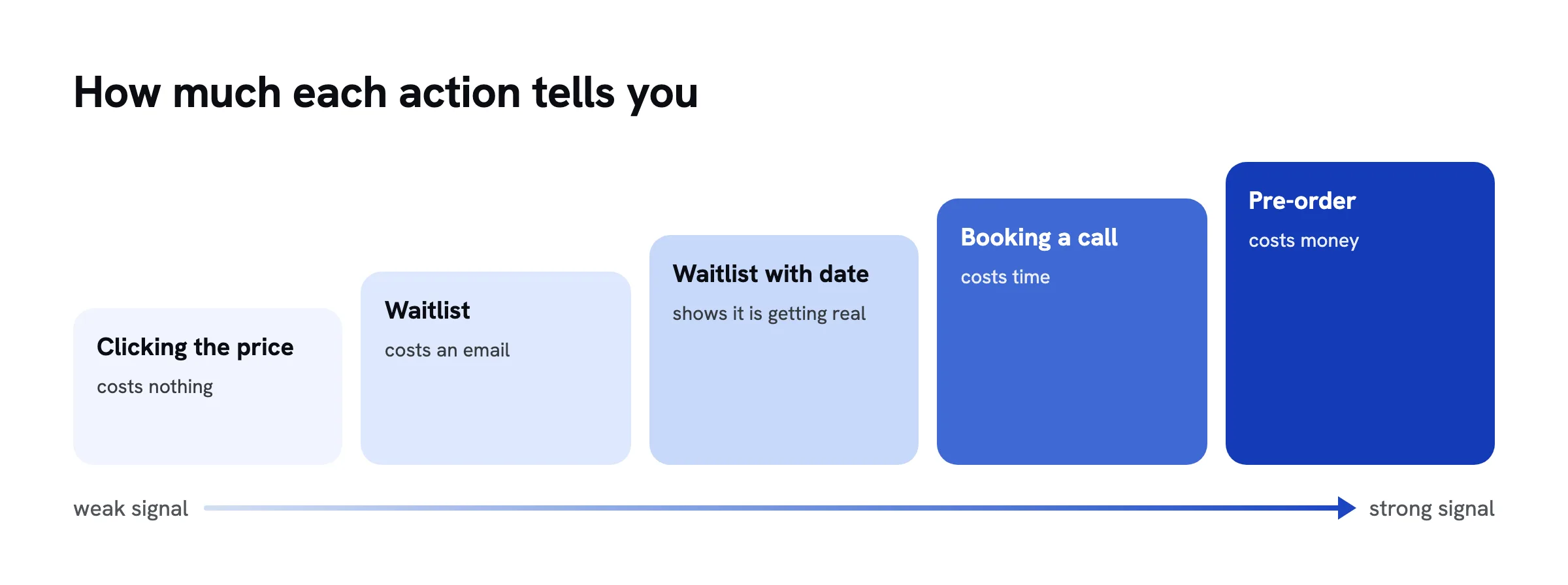
Decide what visitors should do, and pick the most committed action you can honestly offer. The more it costs them, the more it tells you.
From weak to strong: clicking a price, joining a waitlist, joining with a date or budget, booking a call, pre-ordering with a deposit. A "fake door" test, where a button leads to a note that the product is not ready, sits at the weak end. Giff Constable calls landing page tests weak evidence because a sign-up is not a purchase, which argues for a committed action and for the conversations in step 13.
Common mistake: several actions on one page. Then you cannot tell what a sign-up means.
In the example
Lea uses a waitlist that asks for the wedding date. No pre-orders yet, since she has not hired any carers.
Step 6 Describe the offer
Describe your offer as concretely as if it already existed, and say honestly that it is not available yet. Concrete means what, for whom, when and how.
"We make weddings more relaxed" tests nothing, because agreeing costs nothing. "Two carers from 6 pm to midnight for up to eight children" can be tested. A visible "Coming 2027" note keeps the test honest and barely dents sign-ups.
Common mistake: listing features instead of outcomes. "You dance, the kids sleep next door" beats "trained staff".
In the example
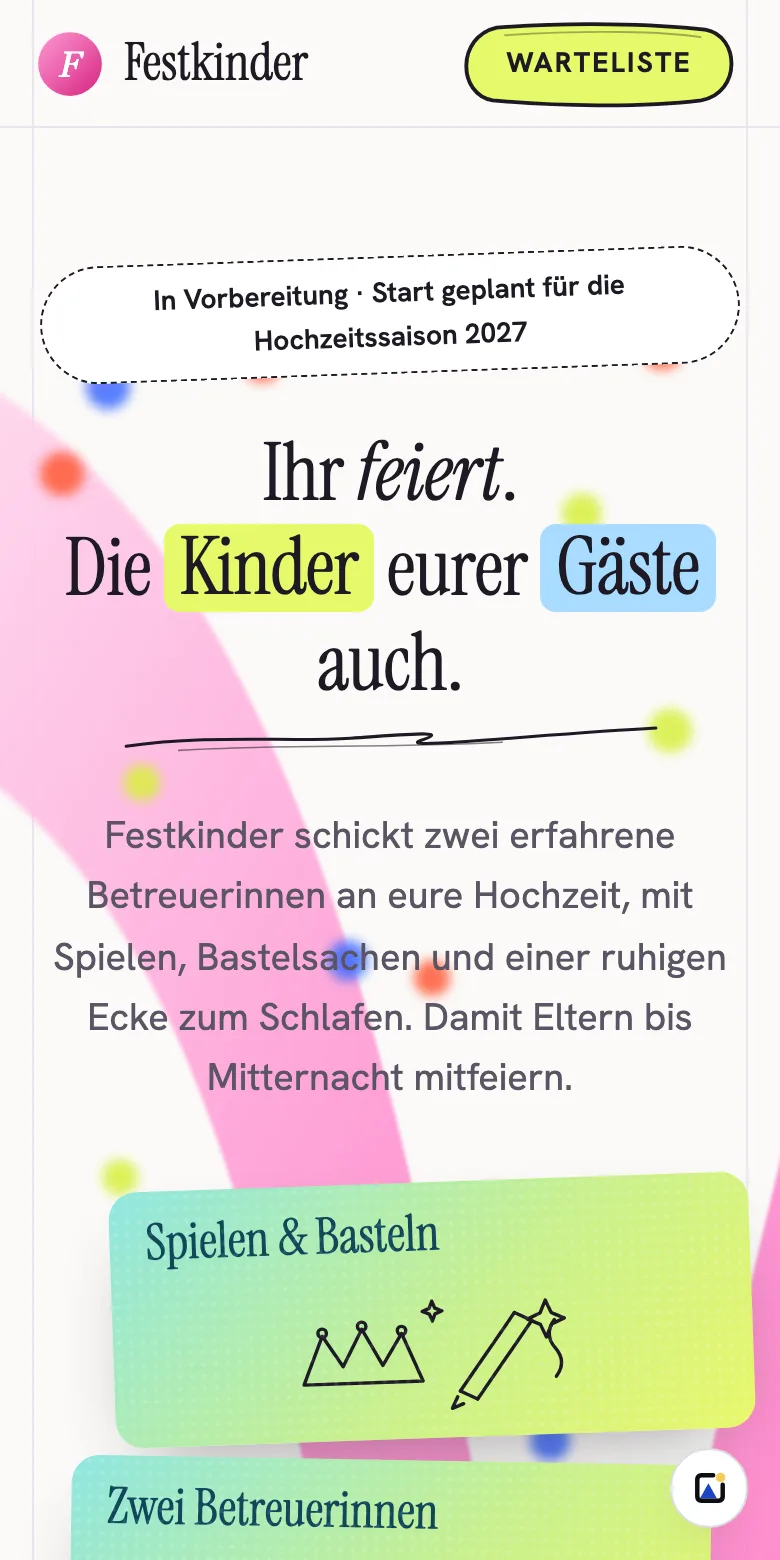
Headline: "You celebrate. So do your guests' kids." Above it, a banner: "In preparation for the 2027 wedding season".
Step 7 Show a price
Put a price or price range on the page. A sign-up from someone who has seen the price tells you far more.
Without a price you are measuring curiosity. "From" and "expected" are honest and enough. Find a starting point by working backwards: what it costs you to deliver, what people pay today for the next best option, and what you need to keep. Unsure? Show two similar groups two prices.
Common mistake: an artificially low price. Then you measure demand for an offer you will never sell.
In the example
"From €390 per evening, two carers, up to eight children. You pay nothing now."
Step 8 Build a page with one action
Build a single page with a headline, the problem, how it works, the price and one call to action. Drop navigation, social links and anything that competes with the button.
The page is a measuring device; every extra element is an exit. One goal, one button, at the top and the bottom. On a phone, the headline and button should show without scrolling. For the page itself in detail, see Landing page with a form: step by step.
Common mistake: polishing the design for weeks. A plain page is enough; collect data sooner.
In the example
Five sections: headline with button, "Sound familiar?", three cards on how it works, price, waitlist. No menu.
Step 9 Form, consent and thank-you page
Ask only for what the test needs, get clear consent, and use the thank-you page for one extra question.
For a waitlist, an email address is enough; add a field only if it sharpens the test. Under the GDPR, consent for later emails must be demonstrable and withdrawable at any time (Article 7), and the box is never pre-ticked. Newsletters usually use double opt-in, a confirmation email with a link. Templates for the notice and the privacy policy are in GDPR contact form. Switzerland's data protection act follows similar principles. Someone who has just signed up will happily answer one more question.
Common mistake: an empty thank-you page. That is the moment visitors pay the most attention.
In the example
Fields: email and wedding date, plus "You may email me once when Festkinder launches". Thank-you page: "What matters most to you about childcare?"
Step 10 Pick a tool and build it in an hour
Pick a tool that gets the page online today. For a test, speed beats features.
| Route | Cost | Effort | Good when |
|---|---|---|---|
| Site builder with forms, such as Carrd Pro Standard | $19 a year, forms and custom domain included | 1 to 2 hours | you want to design it yourself |
| Free: WordPress.com (free) or Google Sites with a Tally or Google Forms form | $0, on the provider's address | 1 to 3 hours | money and address should not matter |
| Have an AI chat (Claude, ChatGPT, Gemini) write the page and put it online with a hosting service | free to a few dollars | 15 to 60 minutes | you would rather describe than drag and drop |
Tally is free with unlimited forms and submissions within fair use; a custom domain there costs $24 a month. WordPress.com with a custom domain starts at $4 a month billed annually.
Disclosure: sharepa is my own product and one of the services for the third route. Claude or ChatGPT writes the page, and sharepa puts it online at an address like your-idea.sharepa.page, with a form and cookie-free statistics. Three pages are free with a small sharepa note. A site builder fits better if you want control over every detail, a form builder if you need branching questions or payments. The Festkinder test page: festkinder-test.sharepa.page (in German).
Common mistake: choosing the tool for the business you hope to have. You can always move later.
In the example
Lea describes the page in Claude, using phrases from her conversations. Forty minutes later it is online.
Step 11 Bring visitors
Get people from your audience to the page through the channels from step 2. Without the right visitors, you measure nothing.
Good options: posts in groups and forums where your audience is (read the rules first), your own network, partners who serve the same people, and a small, tightly targeted ad budget. Give every channel its own link, for example with ?utm_source=instagram, so you can see which one brings sign-ups.
Common mistake: sending the link only to friends. That measures friendship, not demand.
In the example
Three wedding groups, two wedding planners and a €60 ad, each with its own link.
Step 12 Measure
Count visits, sign-ups and where they came from, work out the rate per channel and compare it with your target.
The rate matters more than the visit count: 30 visits with six sign-ups beat 500 with three. Keep going until you reach the visits in your target, and leave out your own visits.
Common mistake: stopping after two days because the first numbers look good or bad.
In the example
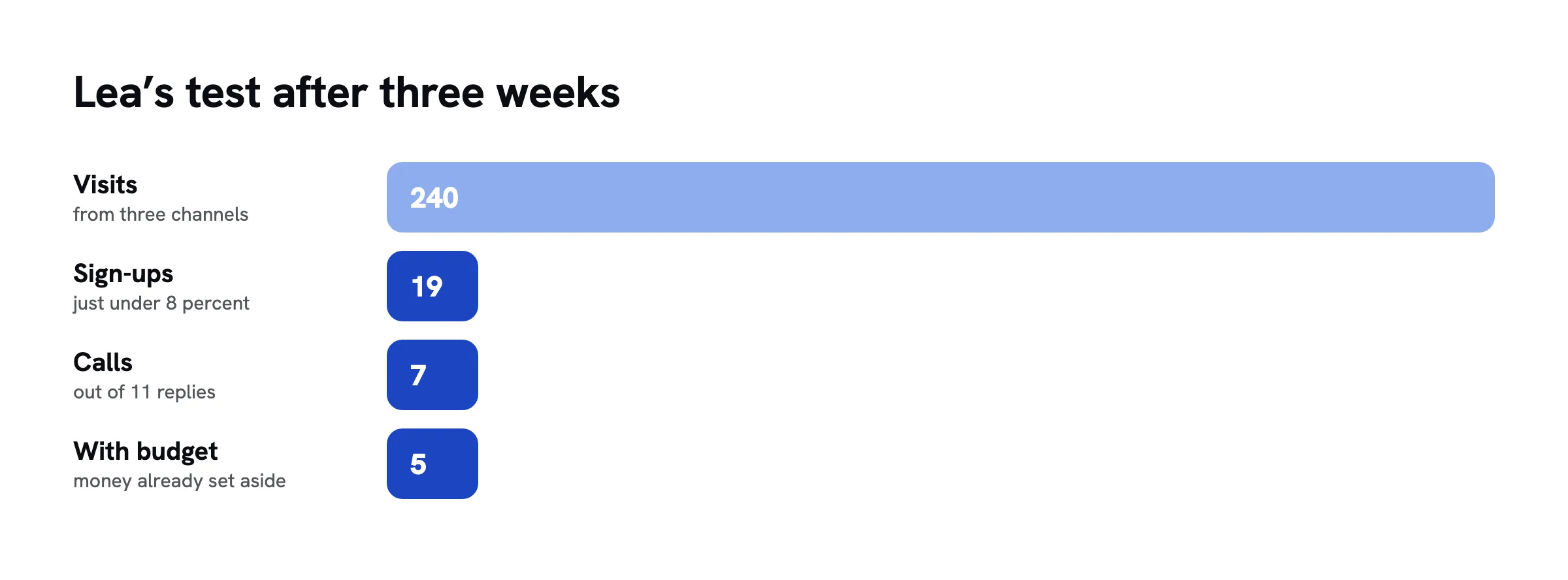
After three weeks: 240 visits, 19 sign-ups, just under 8 percent. The wedding planners send few visitors, but at 14 percent they convert best.
Step 13 Talk to the people who signed up
Email everyone who signed up and ask for a short call. Find out whether they really have the problem, how urgent it is and who decides.
A sign-up is a signal, not proof. Only a conversation shows real intent: When is the wedding? How were you planning to handle the kids? What would you spend? Someone who suggests a time straight away counts for more than someone who never replies.
Common mistake: selling instead of listening.
In the example
Seven couples agree to a call. Five had already budgeted for it; two want to split the cost with the children's parents. Lea had not thought of that.
Step 14 Evaluate and decide
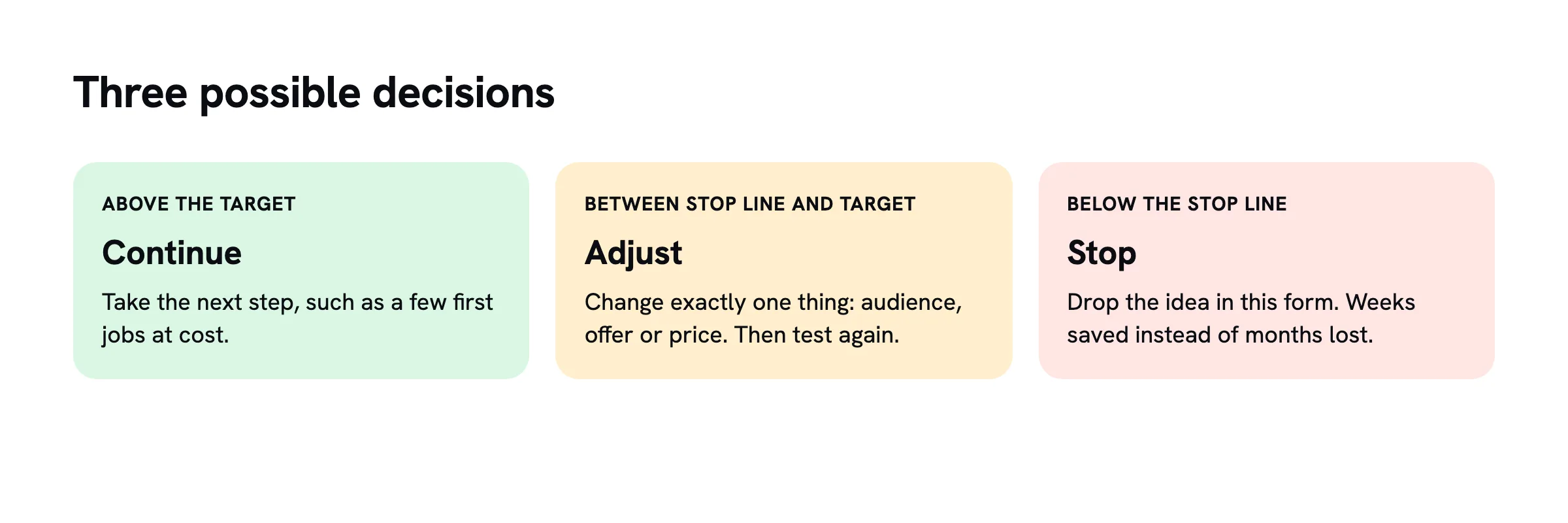
Compare the rate and the conversations with your target, then decide: continue, adjust and test again, or stop.
Above the target with strong conversations: take the next step, such as a few first jobs at cost. Between the stop line and the target: change exactly one thing and test again. Below the stop line: drop the idea in this form, having saved weeks instead of losing months.
Common mistake: declaring a weak test a win because you like the idea. That is why the target has been on paper since step 4.
In the example
Just below target, strong conversations: Lea adjusts and tests a "share the cost with your guests" package.
Step 15 Avoid the common mistakes
Before launch, check your test against the usual failure points. Most tests fail because of how they were set up, not because of the idea.
- Counting friends: they sign up to be nice.
- Too few visits: below roughly 100, any rate is noise.
- No target: without a line drawn in advance, everything gets explained away.
- Mistaking interest for intent: a waitlist shows interest, not budget.
- Money without a delivery date: if you take pre-orders, give a delivery date and refund in full if the product does not happen.
- A dishonest page: never pretend people can buy today.
Common mistake: changing everything after a weak test. Change one thing, then test again.
In the example
Before the second test, Lea notices two sign-ups came from her sister and a friend, and removes them.
Checklist
Checklist
Questions
How many sign-ups do I need to validate a startup idea?
There is no universal number. What counts is your rate compared with the target you set beforehand, backed by enough visits from your audience. As a rule of thumb, a rate based on fewer than about 100 visits says little. An idea is only really validated once someone pays.
Is it okay to build a landing page for a product that does not exist yet?
Yes, as long as the page says clearly that the offer is in preparation. It becomes a problem when you pretend people can buy today, or take money without a delivery date and a refund promise.
How much does it cost to validate a business idea with a landing page?
The page can be free, for example with WordPress.com and Tally, or a free plan for pages written in an AI chat. The real cost is visitors: without your own audience, plan a small ad budget. Add two to four weeks of your own time on the side.
Does a landing page test replace customer interviews?
No. The test shows whether strangers act, the conversations show why. The combination is strongest: conversations before you build, the page as a measurement, and conversations with the people who signed up afterwards.
Sources
- Conversion Benchmark Report 2024, Unbounce, retrieved on 20.10.2026
- Landing Page Tests Aren’t Useful for Validation, Giff Constable, retrieved on 20.10.2026
- The Mom Test, Rob Fitzpatrick, retrieved on 20.10.2026
- Carrd Pro, pricing and features, retrieved on 20.10.2026
- Tally Pricing, retrieved on 20.10.2026
- WordPress.com Pricing, retrieved on 20.10.2026
- Regulation (EU) 2016/679 (General Data Protection Regulation), EUR-Lex, retrieved on 20.10.2026
- Federal Act on Data Protection (FADP), Fedlex, retrieved on 20.10.2026