A calculator on your own website answers the question customers ask first: roughly, what does it cost? Those who get the answer right away are more likely to ask for a quote. The prompt below produces a calculator with inputs, a formula and a result that recalculates on every change. The example is a painting company, but the structure fits removals, cleaning, photo sessions, courses or any service with a few price factors.
How it works
- Write down your formula before you adapt the prompt: base price, factors, surcharges. The AI can do the maths, but it does not know your prices.
- Replace the inputs and the formula in the prompt with yours and paste it into Claude or ChatGPT.
- Check two examples by hand in the preview. If the result is right, copy the code into app.getsharepa.ch/neu or tap "Use this template" below.
- Pick an address, go live. Afterwards you can embed the calculator in your existing website, once you allow embedding for the page.
The prompt
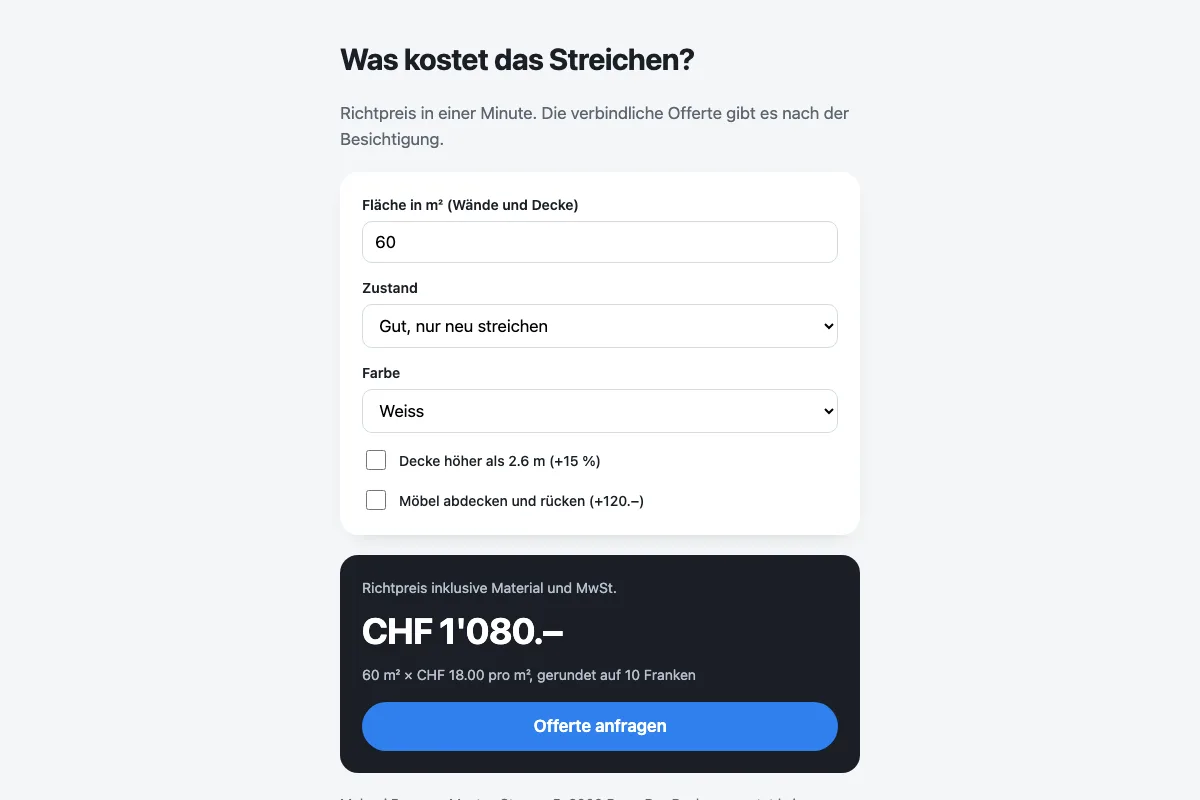
Build a price calculator for a painting company as a single HTML file with the CSS and JavaScript inside.
Inputs: area in m² (number), condition (good / small cracks / remove old wallpaper) as a select, colour (white / coloured) as a select, two checkboxes: "ceiling higher than 2.6 m" (+15 %) and "cover furniture" (+120 francs). Base price 18 francs per m², condition factor 1 / 1.25 / 1.6, coloured +4 francs per m². The estimate is recalculated on every input, rounded to 10 francs, shown large, with one line explaining how it was computed. Below it a button "Request a quote" that opens an email to offerte@beispiel.ch with the details.
Style: matter-of-fact, light grey, the result in a dark card, everything in one column, usable on a phone. Note that the calculator does not replace a site visit.
Tested with Claude
What to adapt
- The inputs: what drives your price? Three to five factors are usually enough, more puts people off.
- The formula and the rounding. An estimate rounded to ten francs looks more honest than one to the cent.
- The enquiry button: email address and subject, so the enquiry lands with you together with the details.
- The note at the end. A calculator gives a guide price, and the page should say so.
Use this template View example
Loads the example into the app. There you can publish it right away or adapt it first.
What it costs
Nothing. The calculator is one file with a bit of JavaScript that runs in your visitors' browser. No server, no database, no fee per calculation.
Questions
Can the calculator store the enquiry directly?
Not in this template: the button opens an email with the details, which is enough for most businesses. If you would rather see the enquiries collected in the app, ask the chat for a form that sends to sharepa. How that works is in the guide to forms.
How do I embed the calculator in my existing website?
Through an iframe with the sharepa address, after turning on “Embedding” for the page. The embedding guide explains it. The calculator stays under your control, and the website does not need touching when prices change.
Does the AI calculate correctly?
The formula in the code is ordinary maths and calculates reliably. What you need to check is whether the AI took over your formula correctly, hence the two examples by hand.