Yes, you can build a website with Claude, as an artifact and on the free plan too. Claude can share it as a link, but without your own address, a password or analytics. Below: how to get the code out of the artifact, which prompts work, and how to publish without copying anything.
What Claude can do on its own
- Artifacts are available on every plan. Claude builds the page and shows it to the right of the chat.
- New artifacts are private. The card reads "Artifact · Only you". In our test Claude still wrote that "the page is online". It means the page sits in your account; nobody else can see it.
- Share turns it into a public link. Visitors need no account, but they see the page inside the claude.ai frame.
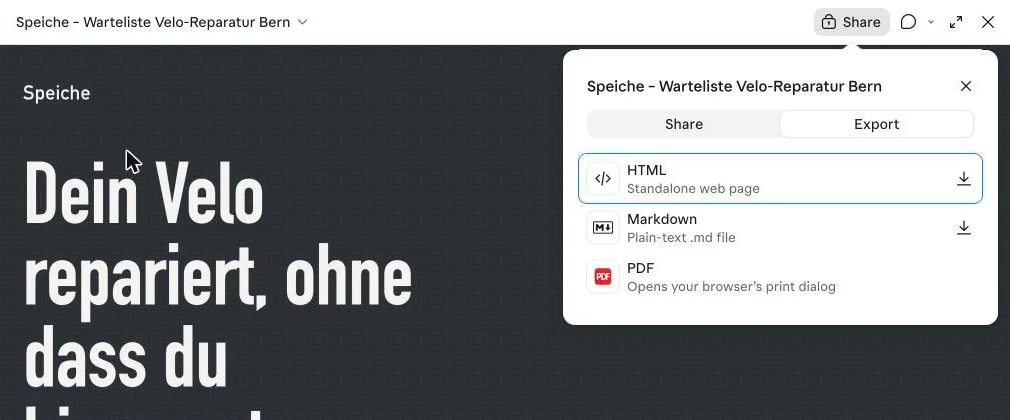
- Export downloads the page as an HTML file, Markdown or PDF. The artifact menu has no "copy code" item.
- Artifacts created before 16 September 2026 still have the old Publish button. For those, see Publish a Claude artifact.
Step by step
- Paste one of the prompts below on claude.ai. An artifact often takes a minute or two.
- The page appears on the right; on the left there's a card saying "Artifact · Only you".
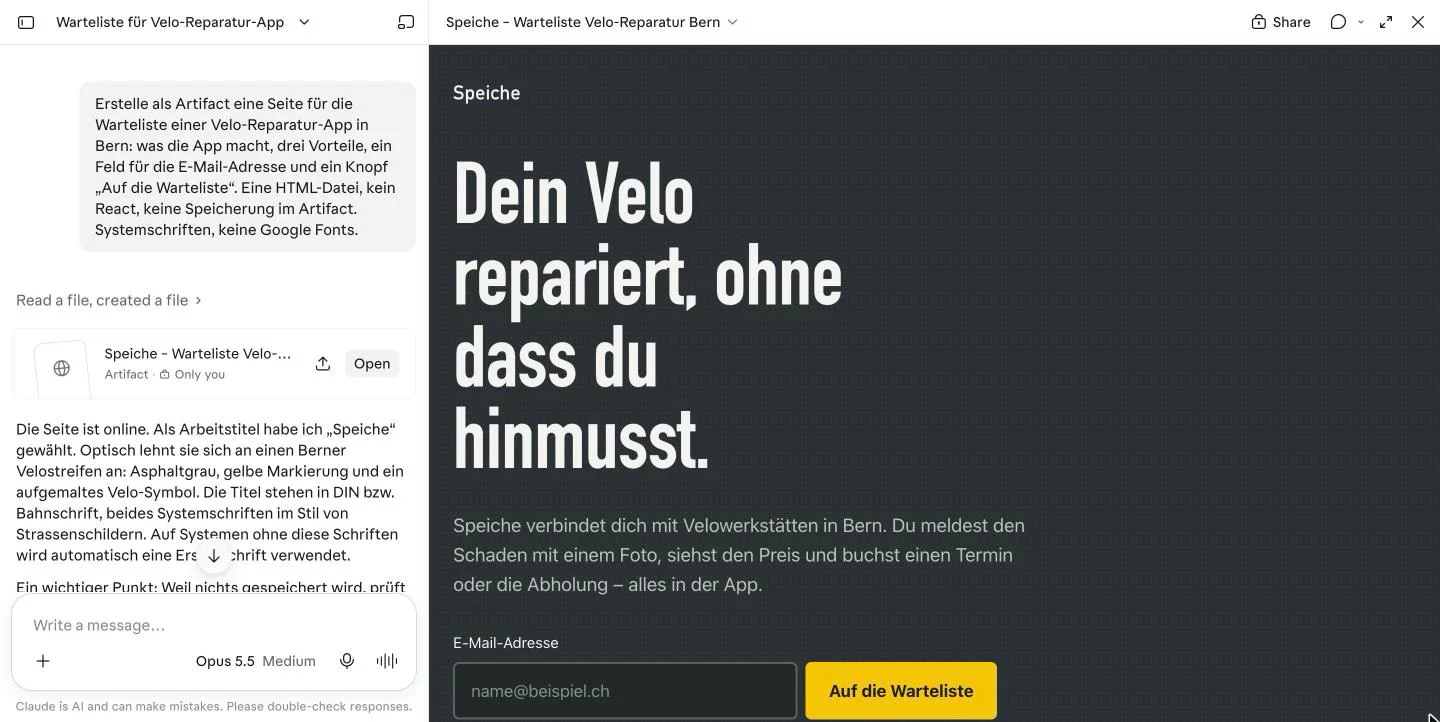
- Click the artifact's name at the top, then Export and HTML · Standalone web page. The file goes to your downloads.
- Upload the file at app.getsharepa.ch/neu with "Choose a file" or drag it in, then check the preview.
- Pick an address such as
spoke-bern.sharepa.pageand go live.
Prompts to copy
Waiting list
Link page
Replace placeholders
Tips for Claude
Check the placeholders
Claude fills gaps with examples: links to example.com, an invented photographer, invented client quotes. In our test, the end of the answer listed what to replace. Read it before the page goes live.
Forms don't store anything
A "Join the waiting list" button shows a confirmation in the artifact, but the address is lost. To collect entries in sharepa, see Build a form with your chat for what the chat needs to know.
Incognito chats have no artifacts
In an incognito chat, Claude creates an HTML file with a preview and a Copy button instead. For sharepa that's even simpler: copy, paste, done.
Publish straight from Claude
With the sharepa connector you say "put this online" in the chat and the page goes live, no export or upload. Claude's free plan allows one custom connector. Setup: Connector for Claude.
Claude or sharepa
| Feature | Sharing in Claude | sharepa |
|---|---|---|
| Plan | Every plan | Free, 3 pages |
| Public without an account | Yes, with Share | Yes |
| Address | Link on claude.ai | name.sharepa.page |
| Custom domain | No | Yes, one on the free plan |
| Password | No | Yes, also free |
| Analytics | No | Yes, without cookies |
| Collect form entries | No | Yes |
| claude.ai frame | Yes | No |
For a page a few people should glance at, Share in Claude is enough.
Questions
Can Claude build a website?
Yes, as an artifact, on every plan including the free one.
Is there such a thing as Claude Sites?
Not under that name. Claude shares artifacts as links on claude.ai. A page at your own address needs a service like sharepa.
Why does my artifact say "Only you"?
New artifacts are private until you share them.
Where do I copy the code?
There's no button for it in the artifact. Use Export to get an HTML file.
Sources
- Anthropic: What are artifacts
- Anthropic: Share artifacts
- Anthropic: Custom connectors
- Basics for every chat: Build a website with AI
Tested on 7 November 2026 with a Max account, as we don't have a free one. According to Anthropic, artifacts are available on every plan.