Through sharepa's MCP server you type "publish this on sharepa" and Claude or ChatGPT puts the page online for you. You stay in the conversation instead of copying and uploading code. You approve access once, and the MCP server costs nothing.
What you get
- From idea to live page in one sentence: the AI builds the page and publishes it right away.
- Changes without detours: "make the button green" and the new version is live at the same address.
- Everything in one conversation: set a password, connect your domain or ask how the page is doing.
- Large pages too: pages with lots of images go up through a separate upload route the AI handles.
- Where you already work: in Claude, in ChatGPT and in Claude Code.
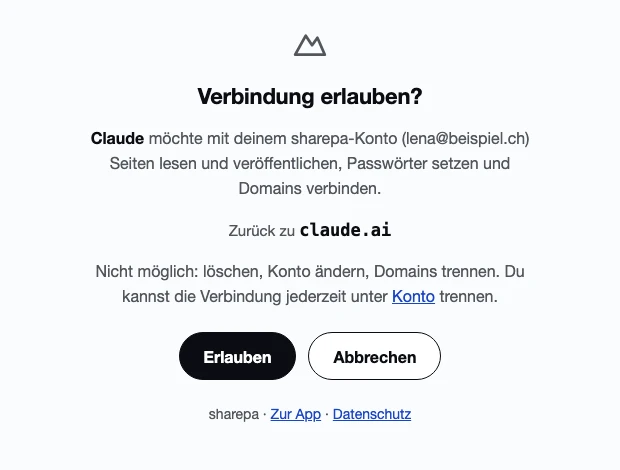
What it can't do
- It can't delete anything, neither pages nor domains. That stays in the app.
- It doesn't read form entries, so your visitors' personal data stays in the app.
- It can't change your account, and an account allows at most three connected apps at a time.
Questions
Does the MCP server cost anything?
No. Every account can use it, free ones included. Your plan's limits apply just as they do in the app: three pages for free, 50 on the one-time plan.
How do I connect it?
As a connector in Claude and in developer mode in ChatGPT, both using app.getsharepa.ch/mcp. The first time, you sign in with your email and a code and approve access.
Does it work with Claude Code?
Yes. Add the same server in Claude Code and publish files straight from your project; the linked guide walks you through it.